
DevOps: Improving Software Development and Delivery
Modern businesses need software that can be developed, tested, updated, and released efficiently. In traditional development environments, delays can sometimes occur when development and operations teams work separately.
DevOps brings these teams and practices closer together, helping improve collaboration, automation, software quality, and the speed of software delivery.
By adopting DevOps practices, businesses can make the software development lifecycle more efficient, respond to changing requirements faster, and deliver updates more smoothly.
What Is DevOps?
DevOps is a software development approach that brings development and IT operations teams closer together. Instead of working in separate stages, teams collaborate throughout the software development and delivery process.
DevOps commonly focuses on:
Collaboration
Automation
Continuous integration
Continuous delivery
Testing
Monitoring
Deployment
Infrastructure management
The main goal is to create a smoother and more reliable way to develop, test, release, and maintain software.
Why DevOps Matters for Businesses
Software requirements can change quickly as businesses respond to customer needs and market demands. New features, security updates, bug fixes, and performance improvements often need to be delivered without unnecessary delays.
DevOps can help businesses:
Release software updates more quickly
Improve collaboration between teams
Automate repetitive tasks
Find and address problems earlier
Improve software reliability
Make deployment more efficient
Support continuous improvement
With a well-planned DevOps approach, development, testing, and operations teams can work more closely together, making the overall software delivery process smoother and more efficient.
Key Principles of DevOps
1. Collaboration
DevOps encourages developers, testers, system administrators, and other technical teams to work closely throughout the software lifecycle.
Better collaboration can reduce communication gaps, make responsibilities clearer, and give everyone a better view of the project’s progress.
2. Automation
Automation helps reduce repetitive manual tasks and allows teams to spend more time on important development work.
Teams can automate activities such as:
Testing
Code builds
Deployment
Infrastructure configuration
Monitoring
Reporting
3. Continuous Integration
Continuous Integration (CI) means regularly adding code changes to a shared development environment. Automated tests can then check the changes and help identify problems before they affect other parts of the application.
4. Continuous Delivery
Continuous Delivery helps teams prepare and release software updates more frequently. Automated processes can move tested code through different environments, making releases more consistent and organized.
5. Continuous Monitoring
Continuous monitoring helps teams keep track of application performance after deployment and identify issues as they occur.
It can monitor areas such as:
Application performance
Server resource usage
Errors
Availability
Response times
DevOps Lifecycle
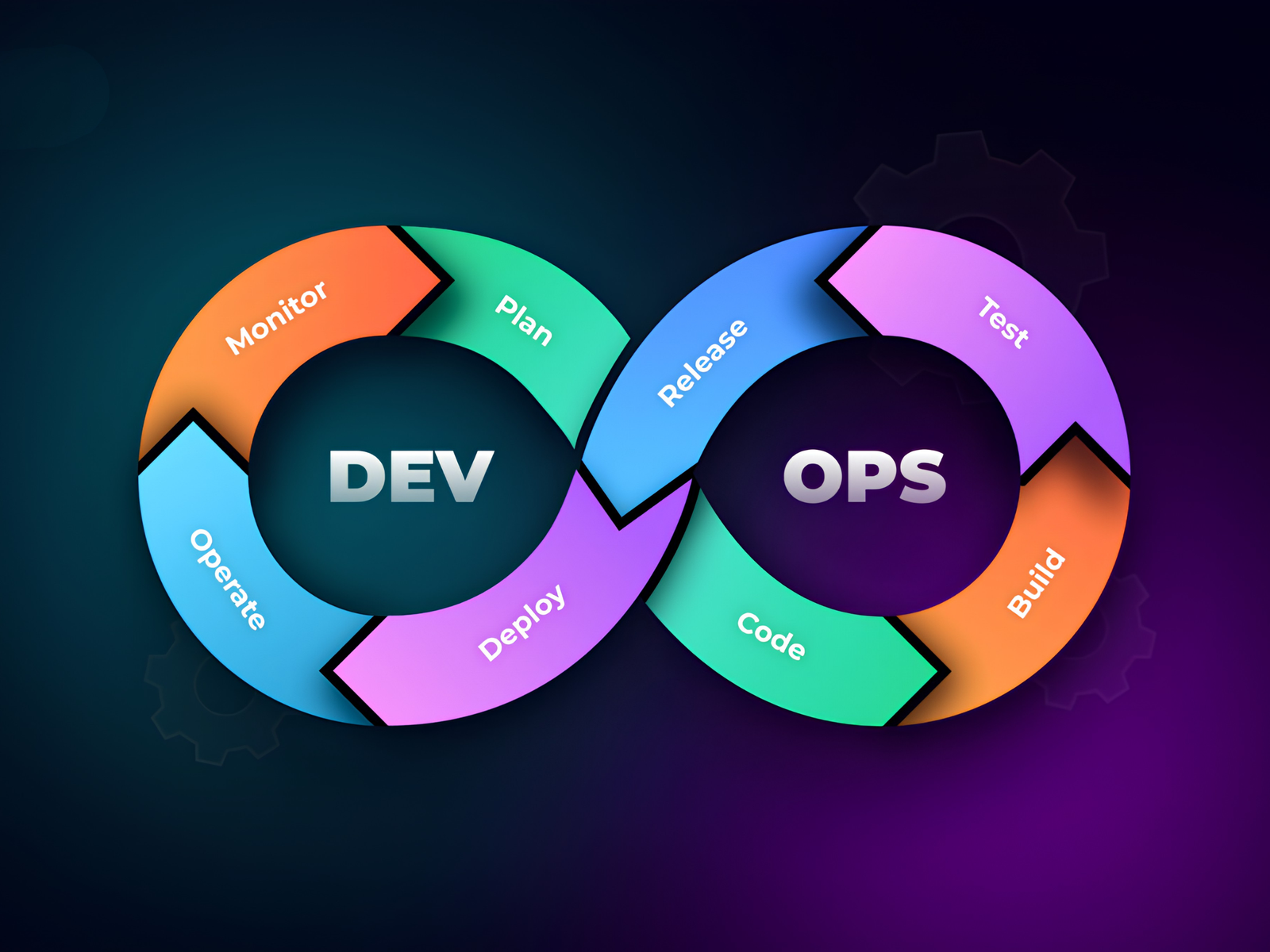
DevOps can be understood as a continuous cycle where teams plan, develop, test, deploy, and monitor software while using the feedback from each stage to improve the next one.
Plan
Teams define project requirements, priorities, tasks, and development goals before work begins.
Develop
Developers write, review, and manage application code based on the project requirements.
Build
The code is compiled, packaged, or prepared so it can move into testing and deployment.
Test
Automated and manual tests are used to find defects and confirm that the software works as expected.
Release
Once the software has been tested and approved, it is prepared for release.
Deploy
The application is moved to the required environment so it can be used by customers or employees.
Operate
Operations teams manage the live application and the infrastructure it depends on.
Monitor
Teams continuously monitor application performance, system health, and user activity to identify potential issues.
The information gathered throughout the cycle can then be used to make improvements and guide the next round of development.
Benefits of DevOps
Faster Software Delivery
Automation and continuous development practices can reduce delays and help teams release software updates more quickly.
Improved Collaboration
Shared tools and processes encourage development and operations teams to work together and communicate more effectively.
Early Problem Detection
Continuous testing and monitoring can help teams spot issues earlier, making it easier to fix them before they become bigger problems.
Better Software Quality
Automated testing and consistent development practices help teams build more reliable and stable software.
Reduced Manual Work
Automation takes care of many repetitive technical tasks, allowing teams to focus more on development and other important work.
Faster Recovery
Monitoring and efficient deployment processes can help teams identify problems quickly and restore affected applications more efficiently.
DevOps Tools and Technologies
DevOps uses a variety of tools to support software development, testing, deployment, and ongoing maintenance. The tools a team chooses usually depend on the project, technology stack, and specific business requirements.
Common DevOps tool categories include:
Version control systems
CI/CD platforms
Container technologies
Cloud platforms
Infrastructure automation tools
Monitoring tools
Testing tools
Collaboration platforms
When these tools are connected and used together, they can help teams automate different stages of the software delivery process and create a more efficient development pipeline.
DevOps and Software Testing
Testing is an important part of the DevOps process because software can go through changes and updates frequently. Integrating testing into development and deployment workflows helps teams catch problems before new releases reach users.
Different types of testing may include:
Unit testing
Integration testing
Functional testing
Performance testing
Security testing
Regression testing
By bringing testing into the development process, DevOps works closely with software quality assurance to help teams maintain reliable and consistent software throughout the development lifecycle.
DevOps and Cloud Computing
Cloud platforms can support DevOps by providing flexible infrastructure and development environments that can be adjusted as project needs change.
With cloud-based environments, teams can more easily:
Create and manage testing environments
Deploy applications
Scale computing resources when needed
Automate infrastructure tasks
Monitor applications and system performance
Using cloud services alongside DevOps practices can help businesses build, update, and manage software more efficiently while adapting to changing requirements.
DevOps in Application Development
DevOps can be used across many types of software projects, including web applications, mobile apps, SaaS platforms, and custom business software.
For example, a SaaS application development project may use automated testing and deployment to release regular updates more smoothly while keeping the application stable and reliable.
Common DevOps Challenges
Adopting DevOps can involve changes to existing development and IT processes, which may take time for teams to adjust to. Some common challenges include:
Limited collaboration between teams
Resistance to changes in established processes
Not enough automation
Poor or outdated documentation
Differences between development and production environments
Security concerns
Gaps in technical skills
These challenges can be managed with proper planning, employee training, clear documentation, and a gradual approach to implementing DevOps practices.
DevOps Best Practices
Start With Clear Goals
Begin by deciding what the organization wants to improve, such as deployment speed, software reliability, team productivity, or development efficiency. Clear goals make it easier to measure progress.
Automate Repetitive Tasks
Look for routine tasks that take up valuable team time and can be safely automated. This can help reduce manual effort while keeping the development process consistent.
Integrate Testing Early
Include testing throughout the development process instead of waiting until the final stage. Early testing makes it easier to find and fix issues before they become larger problems.
Monitor Applications
Regular monitoring helps teams keep track of application performance and identify technical or operational issues as they occur.
Maintain Documentation
Keep clear and up-to-date documentation for processes, system configurations, deployment steps, and other important information. This makes it easier for teams to work consistently and troubleshoot problems.
Improve Continuously
DevOps is not a one-time implementation. Teams should regularly review their processes, learn from results, and make improvements as the business and technology requirements change.
DevOps and Security
Security should be considered throughout the entire software development lifecycle rather than being left until the end.
Development teams can include security checks in their automated workflows to identify potential vulnerabilities and other issues as early as possible.
By making security part of everyday development and deployment activities, teams can address problems sooner and build more secure software without treating security as a separate final-stage task.
Future of DevOps
DevOps continues to evolve as businesses adopt cloud computing, automation, artificial intelligence, containerization, and modern application architectures.
At the same time, businesses are looking for ways to develop and release software faster without compromising quality or reliability.
As development and IT environments become more automated, DevOps will continue to be an important part of building, delivering, and maintaining modern
Conclusion
DevOps brings software development and IT operations closer together through collaboration, automation, continuous testing, deployment, and monitoring.
By improving communication and automating repetitive tasks, DevOps can help teams develop, test, and deliver reliable software more efficiently.
Businesses do not have to adopt everything at once. They can start by addressing specific development challenges, automating processes where it makes sense, and gradually improving their software delivery workflow as their needs evolve.