
Still Approving Every Invoice Manually? How Invoice Automation Can Save Your Team Time
Imagine receiving dozens of invoices every week. Each invoice needs to be checked, forwarded to the right person, approved, recorded, and eventually processed for payment.
Now imagine managing this entire process through emails, paper documents, spreadsheets, and repeated follow-up messages.
It may seem manageable when a business handles only a few invoices. However, as the number of suppliers, employees, and transactions increases, manual invoice processing can become difficult to control.
Invoices may remain unnoticed in inboxes, approvals may be delayed, and employees may spend more time organising paperwork than completing their actual responsibilities.
This is where invoice automation can make a difference. By using digital workflows, businesses can organise invoice collection, verification, approval, and tracking more efficiently.
What Is Invoice Automation?
Invoice automation is the use of software and digital workflows to reduce manual tasks involved in processing business invoices.
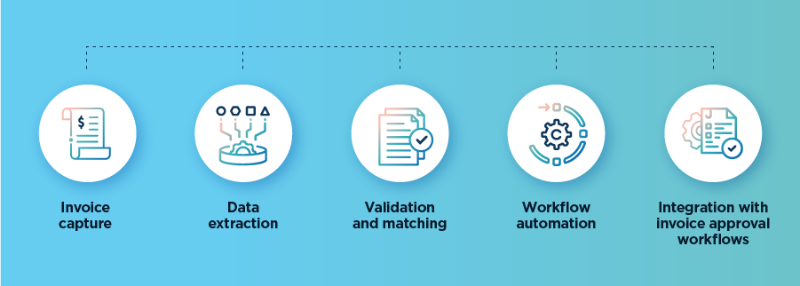
Depending on the software, an automated invoice workflow may include:
Receiving invoices digitally
Recording invoice information
Assigning invoices to responsible employees
Sending approval notifications
Tracking approval status
Recording payment details
Maintaining an organised invoice history
Some systems can also use document-recognition technology to extract information from uploaded invoices. However, extracted information should be checked for accuracy, especially before payments are approved.
6 Common Problems With Manual Invoice Processing
1. Invoices Get Lost in Emails
When invoices arrive through multiple email accounts, employees may struggle to identify which documents have already been processed.
A central digital system can help organise incoming invoices and make them easier to track.
2. Approvals Take Too Long
An invoice may need approval from a department manager, finance team, or business owner.
If the document is forwarded manually, employees may need to send repeated reminders. An automated workflow can route the invoice to the appropriate person and notify them when action is required.
3. Duplicate Payments Become Harder to Detect
Businesses may receive duplicate copies of invoices or accidentally process the same document twice.
An invoice management system can help flag matching invoice numbers, supplier details, and amounts for review. It should still allow authorised employees to investigate possible duplicates before taking action.
4. Employees Spend Time on Repetitive Tasks
Entering invoice information, renaming files, forwarding documents, and updating spreadsheets can consume time.
Automation can reduce repetitive administrative work and allow employees to concentrate on verification, financial planning, and other responsibilities.
5. Payment Status Is Difficult to Track
Without a central record, employees may need to contact different departments to confirm whether an invoice has been approved or paid.
A digital dashboard can show invoice statuses such as:
Received
Under verification
Awaiting approval
Approved
Scheduled for payment
Paid
Rejected or on hold
6. Financial Records Become Disorganised
Invoices are important business records. Keeping them in multiple folders or inboxes makes it harder to retrieve information when required.
A structured digital system can make document storage, searching, and reporting more organised.
How to Create an Automated Invoice Workflow
You do not need to automate everything at once. Start with the most repetitive steps and gradually improve the process.
Step 1: Create a Central Invoice Collection Point
Choose one approved channel where suppliers can submit invoices.
This could be a dedicated email address, a supplier portal, or a document-upload feature within your business software.
Having a central collection point makes it easier to monitor incoming invoices.
Step 2: Capture Important Invoice Details
Your system should record essential information, including:
Supplier name
Invoice number
Invoice date
Due date
Total amount
Tax details, where applicable
Purchase order reference, if required
Document-recognition tools can assist with data entry, but important financial details should be verified by an authorised employee.
Step 3: Set Approval Rules
Not every invoice needs to follow the same approval process.
For example, a department manager may verify whether the service or product was received, while the finance team checks the invoice details.
Define who can approve invoices, who can reject them, and which situations require additional authorisation.
Step 4: Automate Notifications and Reminders
Once an invoice reaches the approval stage, the assigned employee should receive a notification.
If approval is delayed, the system can send a reminder or escalate the request according to predefined business rules.
This helps reduce the need for employees to follow up manually.
Step 5: Connect the Workflow to Your Accounting System
Where technically and legally appropriate, connect the invoice workflow with your accounting or ERP software.
This can reduce repeated data entry and help keep financial records consistent.
Before implementing an integration, check whether the systems support the required data exchange and whether the connection preserves your approval controls.
Step 6: Monitor the Process
Track useful indicators such as:
Number of invoices awaiting approval
Average approval time
Overdue invoices
Invoices requiring correction
Duplicate invoice alerts
These indicators can help management identify delays and improve the workflow.
What Should Businesses Check Before Automating Invoices?
Automation should improve control, not create new risks.
Before implementation, consider the following:
Access permissions: Only authorised employees should be able to approve, edit, or process invoices.
Approval history: Maintain a record of who reviewed and approved each invoice.
Duplicate checks: Use suitable matching rules to identify potential duplicate submissions.
Data protection: Protect financial documents with appropriate security and backup practices.
Human verification: Keep human review for exceptions, unusual amounts, supplier changes, and other sensitive transactions.
Integration requirements: Confirm that the automation system works with your existing accounting, ERP, and banking processes.
Should You Use Ready-Made Software or Custom Invoice Automation?
Ready-made software may be suitable if your business follows standard invoice approval processes.
However, businesses with multiple departments, specific approval rules, or existing software requirements may need a more customised solution.
Custom business software can be designed around your actual workflow. For example, a manufacturing company may require purchase-order verification before invoice approval, while a service business may need confirmation that a project milestone has been completed.
The right choice depends on your invoice volume, existing systems, operational complexity, and budget.
How Five Seven IT Solutions Can Help
Five Seven IT Solutions offers software development, ERP development, and business automation services to help businesses improve their internal processes.
A well-planned automation solution can connect repetitive tasks, organise approvals, and provide better visibility into business operations.
The first step is understanding how invoices currently move through your organisation and identifying which steps can be automated safely.
Final Thoughts
Manual invoice processing can create unnecessary administrative work as a business grows. Invoice automation offers a more structured way to collect documents, manage approvals, track payments, and organise financial records.
Start by identifying the biggest delays in your current process. Then choose an automation solution that improves efficiency while maintaining proper financial controls.
Want to simplify your business’s invoice approval process? Speak with Five Seven IT Solutions about developing an automation workflow that fits your operations.