One Employee Leaves, but Their Business Accounts Stay Active: Why IT Access Management Matters
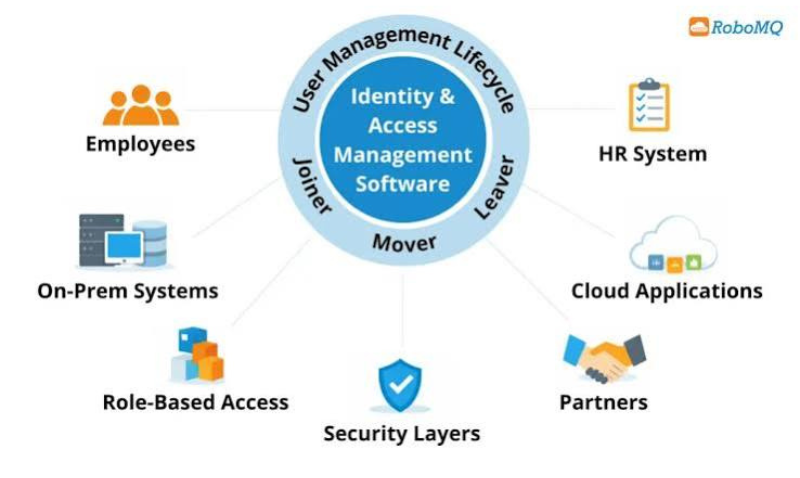
Imagine an employee leaving your organisation.
Their work is handed over, their desk is cleared, and the company moves on to its next task. But what happens to the employee’s email account, cloud storage access, business applications, and login credentials?
If these accounts remain active, the organisation may continue to have unnecessary access risks.
This situation can happen when businesses manage employee access manually or do not follow a consistent process when staff join, change roles, or leave.
Every employee should have access to the systems required for their responsibilities, but that access should also be reviewed and updated when those responsibilities change.
Employee access management helps businesses control who can access their digital systems, what they are permitted to do, and when that access should be removed.
What Is Employee Access Management?
Employee access management is the process of creating, assigning, reviewing, changing, and removing employee permissions across business systems.
It applies to resources such as:
Business email accounts
Company computers
Cloud storage
Accounting software
ERP and CRM systems
Internal business applications
Customer databases
Shared folders
Administrative dashboards
For example, a sales employee may need access to customer records and CRM software, while a finance employee may require access to accounting applications.
Both employees should receive only the permissions necessary for their responsibilities.
6 Reasons Your Business Needs a Proper Access Management Process
1. Prevent Unnecessary Account Access
Employees sometimes retain access to systems they no longer need.
This may happen after a promotion, department transfer, or change in responsibilities.
Regular access reviews help identify unnecessary permissions and reduce the number of accounts with access to sensitive information.
2. Reduce the Risk of Unauthorised Activity
Shared accounts and poorly managed passwords can make it difficult to identify who performed a particular action.
Where possible, provide employees with individual accounts and use appropriate authentication controls.
This helps organisations maintain clearer accountability.
3. Protect Sensitive Business Information
Not every employee needs access to every business document.
For example, customer service employees may need access to selected customer records, while financial reports may need to remain restricted to authorised finance staff.
Role-based permissions can help organise access according to job responsibilities.
4. Make Employee Offboarding More Reliable
When an employee leaves, the organisation should follow a documented process for removing or transferring access.
This may include:
Disabling company accounts
Revoking application sessions where supported
Removing access to shared folders
Reviewing administrator privileges
Recovering company devices
Transferring business-owned files
Updating access lists and records
The process should be coordinated with HR and relevant department managers.
5. Improve Visibility Across Business Systems
As a company grows, employees may use many different applications.
Without a central record, management may not know which employees have access to which systems.
An access register or suitable identity management platform can help maintain an overview of users, applications, and permissions.
6. Support Better Security Governance
Organised access management can help businesses demonstrate that access permissions are reviewed and controlled.
It can also support internal policies and security audits.
The exact requirements will depend on the organisation’s industry, contractual obligations, and applicable regulations.
How to Create an Effective Employee Access Management Process
Step 1: Create an Inventory of Business Accounts
Start by identifying the systems employees use.
Create a register containing:
Application or system name
Account owner
Assigned employee
Permission level
Business purpose
Account status
Responsible administrator
Include important cloud services and third-party applications, not just office computers.
Step 2: Define Employee Roles and Permissions
Determine what each department and job role needs to access.
For example:
Employee role | Example access requirements |
|---|---|
Sales team | CRM and approved customer records |
Finance team | Accounting and financial reports |
Marketing team | Marketing platforms and campaign analytics |
HR team | HR software and authorised employee records |
IT administrator | Approved system administration tools |
These are examples, not universal permissions. Actual access should reflect individual job responsibilities.
Step 3: Apply the Principle of Least Privilege
The principle of least privilege means giving employees only the permissions they need to perform their work.
For example, an employee who needs to view a report may not need permission to delete it or change its settings.
Separate ordinary user permissions from administrator privileges.
Review elevated permissions regularly and restrict them to authorised personnel.
Step 4: Strengthen Login Security
Use suitable authentication controls to protect business accounts.
Consider:
Multi-factor authentication
Strong, unique passwords
Password managers
Individual employee accounts
Secure account recovery procedures
Monitoring for suspicious login activity
Multi-factor authentication is particularly important for email, administrator accounts, cloud storage, and other sensitive systems.
Common Employee Access Management Mistakes
Sharing login credentials: Shared accounts reduce accountability and make access removal more difficult.
Giving everyone administrator access: Excessive permissions increase the potential impact of mistakes or compromised accounts.
Ignoring temporary employees and contractors: Temporary access should have a clear business purpose and an appropriate expiry or review date.
Forgetting third-party applications: Employees may use external tools that are not included in the main IT account register.
Delaying offboarding: Access removal should be part of the employee departure process, not an optional task to complete later.
Not documenting changes: Without records, it becomes harder to understand who authorised access and why.
Which Tools Can Help Manage Employee Access?
Smaller businesses may begin with a documented access register, individual accounts, and a consistent onboarding and offboarding checklist.
Larger organisations may benefit from identity and access management solutions that support centralised authentication, automated account provisioning, and access reviews.
When selecting a solution, consider:
Compatibility with existing software
User and administrator management
Multi-factor authentication support
Role-based permissions
Reporting and audit capabilities
Integration requirements
Ongoing maintenance costs
Avoid purchasing a complex platform before understanding your actual access management requirements.
How Five Seven IT Solutions Can Help
Five Seven IT Solutions provides IT services, software development, and business technology solutions to help organisations manage their digital infrastructure.
Businesses can review their current IT setup, identify gaps in account management, and establish more organised processes for system access and permissions.
Whether you need assistance with IT infrastructure, software systems, or a broader technology improvement plan, the right starting point is understanding how employees currently access and use business resources.
Final Thoughts
Employee access is an important part of business security. Every new employee, role change, and departure can affect which systems should be accessible.
A clear employee access management process helps businesses maintain appropriate permissions, protect important information, and reduce unnecessary account exposure.
Start by documenting your existing accounts, assigning permissions based on job responsibilities, and introducing a consistent offboarding checklist.
Want to make your business IT environment more secure and organised? Contact Five Seven IT Solutions to discuss IT services and technology management solutions for your organisation.